How to Extend WiFi Coverage to Your Whole Home
You’re on a video call, the connection drops, and you already know exactly which room you’re in. There’s always that one spot — the bedroom at the end of the hall, the home office behind the garage, the kitchen where your router’s signal apparently goes to die. If you’ve lived with dead zones long enough, you’ve probably tried moving the router, rebooting it, or just accepting your fate. None of that actually fixes it.
The good news: extending WiFi coverage isn’t rocket science. The bad news: the options range from “genuinely useful” to “complete waste of money,” and the marketing won’t tell you which is which. Let’s go through what actually works — sorted by budget — so you can stop making excuses for why your smart TV keeps buffering.
Read also: How to Free Up Disk Space in Windows 11 (Full Guide)
First, Figure Out What You’re Actually Dealing With
Before spending anything, run a quick diagnosis. On Windows, open a Command Prompt and type netsh wlan show interfaces — it’ll show your signal strength as a percentage. On Mac, hold Option and click the WiFi icon in the menu bar to see RSSI (signal strength in dBm). Anything worse than -70 dBm and you’ve got a real problem, not just a slow ISP day.
Also check your router placement. It sounds obvious, but routers get shoved into cabinets, tucked behind TVs, or buried in closets all the time. Your router needs to breathe. It should sit elevated, in a central location, away from walls and metal appliances. A router on the second floor, center of the house, will outperform the same router in a basement corner every single time.
The Budget Fix: Powerline Adapters (~–)
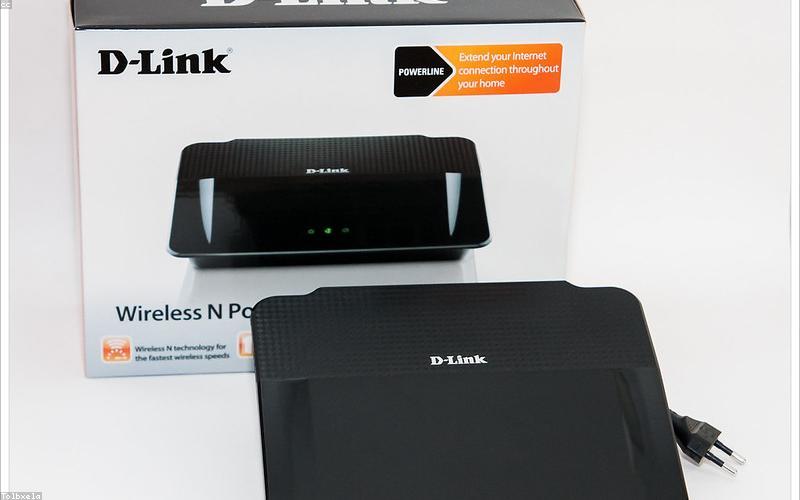
If you’ve got Ethernet cable running through your walls — or can live with a wired connection in your problem room — powerline adapters are underrated. You plug one adapter into a wall outlet near your router (connected via Ethernet), and another in the distant room. They use your home’s electrical wiring to carry the network signal. The TP-Link AV1000 kit (around ) is a solid entry point.
It’s not glamorous. It won’t make your neighbors envious. But it’s stable, low-latency, and works great for a home office or a gaming setup in a room that just can’t reach the main router.
One catch: don’t plug them into surge protectors or power strips. They need to go directly into a wall outlet, or performance tanks significantly.
The Middle Ground: WiFi Range Extenders (–)
This is where most people start — and where most people get disappointed. Range extenders (sometimes called WiFi repeaters or boosters) grab your existing WiFi signal and rebroadcast it. They work, but with caveats.
- They create a separate network SSID, so your devices don’t roam seamlessly between your main router and the extender.
- They cut bandwidth roughly in half, because they’re receiving and rebroadcasting on the same channel.
- Placement is tricky — put them too far from the router and they repeat a weak signal, which just gets you a slightly less bad dead zone.
If you go this route, the TP-Link RE550 or the Netgear EX7500 are among the better options. Place the extender halfway between your router and the dead zone, not inside the dead zone itself. And connect devices to the extender’s network manually from Settings > WiFi on your device — don’t let them cling to the main router out of habit.
Honest take? Extenders are fine for casual browsing in a bedroom that’s just slightly out of range. For anything bandwidth-intensive or latency-sensitive, they frustrate more than they help.
The Real Solution: A Mesh WiFi System (–+)
If you want the dead zones gone for good, mesh is the answer. A mesh system uses two or three nodes that work together as a single unified network. Your devices roam between them automatically, always connecting to the strongest node. There’s no separate SSID to manage, no awkward handoffs, no half-speed penalty.
The TP-Link Deco XE75 (two-pack, ~) covers most homes up to 4,500 sq ft and supports WiFi 6E. The Eero Pro 6E is slightly pricier but integrates beautifully with Amazon Alexa and has a fantastic app. For larger homes or those with thick concrete walls, the Google Nest WiFi Pro (six GHz tri-band) is worth the extra spend.
Setup is dead simple. Most mesh systems are configured entirely through a smartphone app — you scan a QR code on each node, place them around your home, and you’re done in under 20 minutes. The app for Eero, for example, lives at eero.com/app and walks you through placement suggestions based on your floor plan.
The one thing mesh systems won’t fix is a bad ISP connection. If your internet plan is the bottleneck, distributing the signal more evenly just means everyone in the house shares the slow connection more fairly.
The Wired Backbone Option: Access Points
If you’re comfortable running Ethernet cable — or already have it in your walls — a dedicated access point is the cleanest solution. Something like the Ubiquiti UniFi U6 Lite (~) connected via Ethernet cable gives you rock-solid, high-throughput coverage in any room without the compromises of wireless extenders.
It’s a bit more setup — you’ll configure it through the UniFi Controller software or the UniFi app on your phone — but once it’s running, it’s bulletproof. This is what IT professionals put in actual offices, and it shows.
Which One Should You Actually Buy?
Here’s the short version:
- Dead zone is one room, you can run a cable: Powerline adapter or a wired access point.
- Dead zone is one or two rooms, casual use: A decent WiFi extender placed properly.
- Multiple dead zones, whole-home coverage needed: Mesh system, full stop.
- You’re technical and want the best performance: Ethernet-backboned access points (UniFi or similar).
Skip the cheap “WiFi booster” devices you’ll find on Amazon for . They’re almost universally garbage — rebranded hardware with outdated chips and no meaningful range improvement. The few extra dollars toward a name-brand solution pays off in hours of not troubleshooting.
Your home deserves the same WiFi coverage everywhere. The bedroom at the end of the hall shouldn’t feel like a digital exile. Pick the right tool for your situation, place it correctly, and that one dead room becomes just another room.
Preguntas Frecuentes
First, Figure Out What You're Actually Dealing With
Before spending anything, run a quick diagnosis.
The Budget Fix: Powerline Adapters (~–)
If you've got Ethernet cable running through your walls — or can live with a wired connection in your problem room — powerline adapters are underrated.
The Middle Ground: WiFi Range Extenders (–)
This is where most people start — and where most people get disappointed.
The Real Solution: A Mesh WiFi System (–+)
If you want the dead zones gone for good, mesh is the answer.
The Wired Backbone Option: Access Points
If you're comfortable running Ethernet cable — or already have it in your walls — a dedicated access point is the cleanest solution.