This tool lets you automatically update all your Windows 10 and 11 apps and it’s open-source
UpdateHub is an application that lets you automatically update almost every program installed on your PC. Backed by the assurance that it is an open-source app with no bloatware bundled into its software, this straightforward tool makes it easy to keep your applications up to date. A free app that detects updates for your programs — the application is built on top of winget, but in this case comes with a graphical interface that lets you carry out any task with ease. Its purpose is to detect whether updates are available for the programs on your PC. While Windows does support automatically updating its own operating system components and applications downloaded from the Microsoft Store, it does not cover third-party software downloaded from other sources. UpdateHub steps in to handle exactly that.
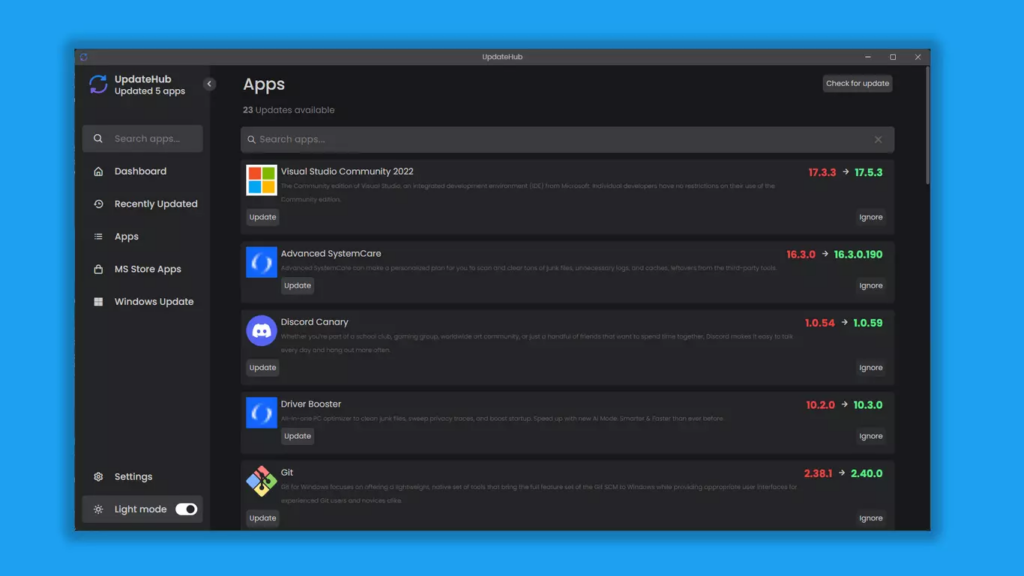
That said, while it is a quite effective app and considerably better than alternatives like IOBit, you may occasionally come across an application it cannot detect, meaning you will still need to update those manually.
Read also: How to Create a Hard Drive Partition in Windows
Its interface is clean and straightforward. There is a menu listing all applications that have a pending update, and in the sidebar you will also find several useful options — including the ability to install updates in two modes: silent or interactive. In silent mode, the update installs with nothing more than a progress bar shown in UpdateHub, while interactive mode presents the installer options of the program being updated.
The app also provides information about the size of each update, the currently installed version, the newly available version, and more. Best of all, if an update ships loaded with bugs, you can roll back to the previous version using a built-in option within the application.
How to Install and Use UpdateHub
Getting started is straightforward. Head to the UpdateHub GitHub page, download the latest release, and run the executable — no installation required. It’s a portable app, so you can keep it on a USB drive and use it across different machines.
When you open it, UpdateHub scans your system and shows a list of apps with available updates. You select the ones you want, hit update, and it handles the rest via winget in the background. The whole thing takes a couple of minutes depending on how many apps you have installed.
What It Does Well (and Where It Falls Short)
The biggest advantage over running winget manually is the interface. Most people aren’t comfortable with the command line, and UpdateHub removes that barrier entirely. It also shows version numbers before and after, so you know exactly what changed.
That said, it doesn’t catch everything. Apps installed outside the winget ecosystem — things you downloaded directly from a vendor’s website — won’t appear here. Same goes for Microsoft Store apps, which have their own update mechanism. Think of UpdateHub as covering around 70-80% of your commonly updated programs, not all of them.
It also doesn’t run automatically in the background. You have to open it manually. If you want truly automatic updates, you’d need to combine it with a scheduled task — which is a bit beyond what most users want to deal with.
Is It Worth It?
For most people, yes. If you’re the type who installs a program and then forgets it exists for two years, UpdateHub is a simple way to close those security gaps without thinking about it. VLC, 7-Zip, Notepad++, Firefox — those kinds of apps accumulate outdated versions on almost every PC I’ve worked on.
It won’t replace Windows Update or your antivirus, but it fills a real gap that most users ignore until something goes wrong.
Frequently Asked Questions
Is UpdateHub safe to use?
Yes. It’s open-source and uses Windows’ own winget package manager under the hood, so it’s not doing anything unusual. You can review the source code on GitHub if you want to be sure.
Does it work on Windows 10?
Yes, it works on both Windows 10 and Windows 11, as long as winget is installed. On Windows 10, you may need to install the App Installer from the Microsoft Store first.
Can UpdateHub update Microsoft Store apps?
No. Microsoft Store apps update through the Store itself. UpdateHub covers apps managed by winget, which are traditional desktop applications.
Will it update my browser automatically?
Most major browsers like Firefox and Chrome are supported via winget. Chrome in particular often handles its own updates, but having it show up in UpdateHub doesn’t hurt.
Is there a way to schedule automatic updates with UpdateHub?
Not natively. You’d have to create a Windows scheduled task pointing to UpdateHub’s command-line options. It’s doable, but not exactly beginner-friendly.