XToolBox: Apps and Scripts to Optimize Windows
📅 Actualizado: 2026 — Este artículo ha sido revisado y actualizado con la información más reciente.
Long story short: With every major edition of Windows comes the need to apply new optimizations. Adjusting power settings, reducing memory consumption, removing bloatware, disabling pointless services, and blocking telemetry can take a very long time without the right tools — but the XToolBox pack aims to bring them all together in one place. It includes more than 50 programs and scripts with a very advanced profile, and in some cases, a dangerous one.
Read also: Windows 11 Mouse Cursor Lag How to Fix
All Windows users are condemned to an eternal dance: What Microsoft considers «appropriate» for the majority of machines is nothing more than a generic profile loaded with junk, with irrelevant background services, frequent connections back to the mothership, and hotfixes that often make things worse.
We only want five things from Windows: Speed, stability, efficiency, compatibility, and to stay out of the way. Redmond hasn’t gotten the message, which means the heavy lifting falls on us. Fortunately, there is a wide range of tools focused on optimizing Windows, and the XToolBox launcher simply streamlines the download and execution process.
XToolBox: Optimizing Windows with Scripts and Applications
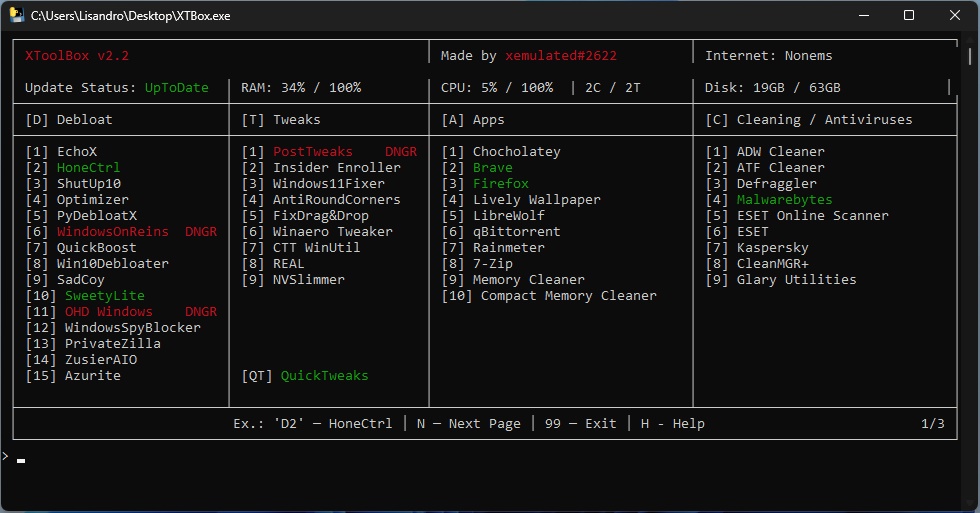
XToolBox uses the system console to present its interface, and the first thing to understand is its color coding. In short, green entries are recommended, red ones carry some risk or danger, and those marked «DNGR» have the potential to break existing Windows installations. The key word here is «potential», but it’s never a bad idea to experiment in a virtual environment before performing major surgery.
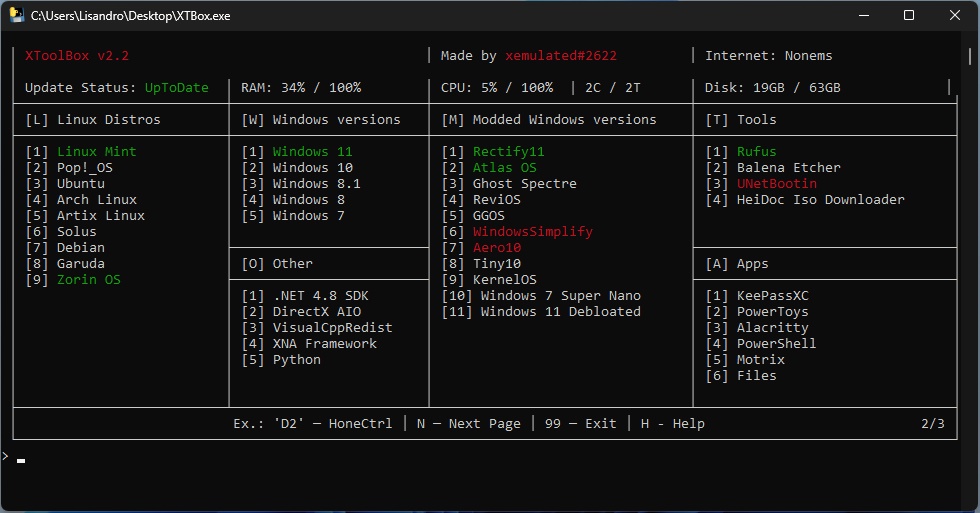
The launcher also includes programs that will be very familiar. ShutUp10 in the Debloat section, NVSlimmer for cleaning Nvidia drivers, Brave, LibreWolf and Firefox as browsers, Chocolatey for easy application installs, qBitTorrent as an open source BitTorrent client, and MalwareBytes for detecting and removing malware.

The second page of XToolBox focuses on Linux distros, Windows images, additional packages such as the DirectX redist and .Net 4.8, modified versions of Windows, Rufus and BalenaEtcher for managing images, and secondary apps like KeePassXC and PowerToys. The last page is dedicated to game clients, launchers and Minecraft clients, and miscellaneous tools like Discord and Spotify. XToolBox is portable, free, and open source. Download a copy!
What’s Inside XToolBox
The pack is split into categories: performance tweaks, privacy tools, debloaters, system utilities, and some more aggressive scripts that touch areas like Group Policy and service configurations. The lighter tools — things like disabling startup programs, clearing temp files, or adjusting visual effects — are safe to run on any machine. The scripts that disable Windows telemetry or modify system services need more care.
Before running anything from XToolBox, back up your system. This isn’t paranoia — some of the included scripts make changes that are genuinely difficult to reverse if something doesn’t work on your specific setup.
The Most Useful Tools in the Pack
The startup manager and temp file cleaner are immediately useful for almost everyone. The RAM optimizer is hit-or-miss depending on your hardware. The telemetry blocker is effective but aggressive — it disables some features you might actually want, like Windows Update notifications.
The debloater scripts for removing pre-installed apps (Teams, Xbox, Cortana remnants) work well on fresh Windows installs. Running them on an established system carries more risk because it’s harder to predict what else depends on those components.
Who Should Use It
XToolBox makes most sense for people setting up a new Windows machine and wanting to strip it down from day one — before they’ve installed anything personal. Using it on a working daily driver is riskier. The more time you’ve had a system running, the more things tend to depend on each other in ways that aren’t obvious.
If you’re comfortable troubleshooting and have a backup, go ahead. If you’re not, stick to the basic cleanup tools and leave the system-level scripts alone.
Frequently Asked Questions
Is XToolBox safe to use?
The basic tools are safe. The more advanced scripts — especially those that modify services or disable telemetry — carry some risk depending on your system. Always create a restore point first.
Does XToolBox work on Windows 11?
Yes, most tools are compatible with both Windows 10 and 11. Some scripts were originally written for Windows 10, so double-check compatibility notes for anything that touches system settings.
Will using XToolBox speed up my PC noticeably?
It depends on your starting point. On a bloated new PC fresh from a manufacturer, the difference can be significant. On a clean installation you’ve maintained yourself, the gains are smaller.
Can I undo the changes XToolBox makes?
Some changes are reversible, others aren’t easily. That’s why creating a system restore point before running anything is essential — it gives you a clean escape route.
Where do I download XToolBox?
From its official GitHub repository. Avoid downloading it from third-party sites — the open-source version on GitHub is the only one you should trust.