
OSINT Tools:
Google Dorks
Also known as Google Dorking or Google Hacking, this technique involves using Google’s search operators to perform advanced queries.
Understanding how these operators work and applying a bit of creativity will lead us to uncover highly valuable information. Keep in mind that Google automatically indexes the content of any website (unless instructed otherwise), making it possible to retrieve all kinds of information through these methods.
Read also: Rescuezilla, a Tool That Simplifies System Backup and Restore
The Google Hacking Database contains an extensive collection of dorks that other hackers have used when conducting various advanced searches.
Bing Dorks
Same concept as Google Dorks, with subtle differences in operator syntax, which opens up different options and possibilities.
It is often an overlooked tool due to its close resemblance to its Google counterpart, but it’s worth remembering that the crawlers indexing the web differ between the two search engines — which means they return different results compared to a similar dork used on Google.
This case already illustrates why it’s a good idea to be familiar with different tools that serve similar purposes. The results from both alternatives can be complementary, and that always adds value when seeking more information and cross-referencing data, ultimately improving the quality of our investigations.
Shodan
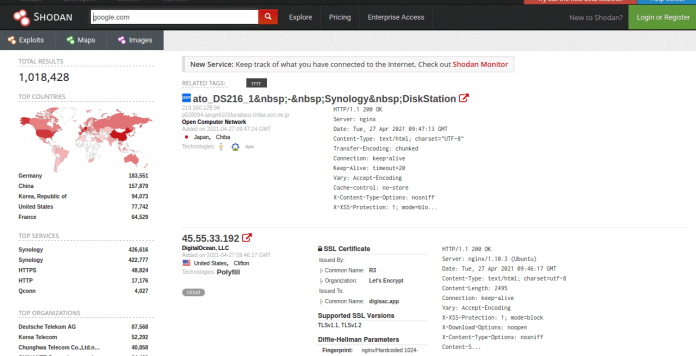
A powerful search engine that allows users to discover internet-connected devices through various filters.
Commonly known as “the hackers’ Google”, Shodan lets you find servers, routers, webcams, IoT devices, and more. You can also dig deeper by examining the information contained in their banners.
Using filters, you can refine your searches by country, city, open port number, date, operating system, and more.
Shodan is undoubtedly a resource that rarely goes missing from researchers’ workflows.
Maltego
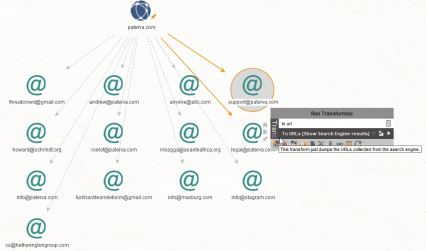
This is a powerful tool that collects information about a target and displays it as a graph, making it easy to analyze the various relationships at a glance.
It is particularly useful when targeting a company, individual, or website during the early stages of reconnaissance, as it returns a large amount of cross-referenced data and enables enumeration across multiple vectors that can be further investigated.
TheHarvester
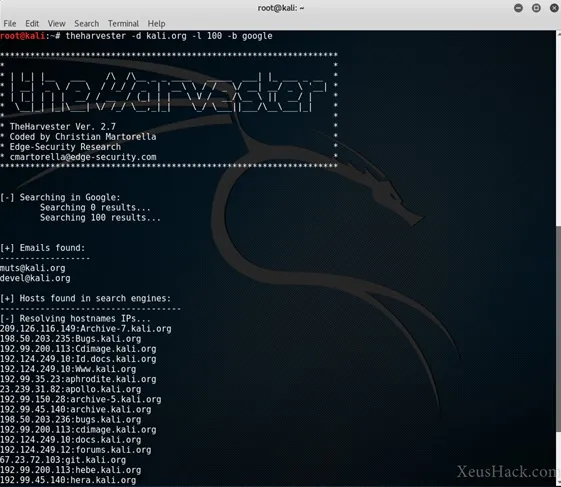
A versatile command-line tool that collects publicly available information from the web (emails, subdomains, names, URLs, and more). This information gathering can be performed in two ways: passive and active.
With passive collection, it never interacts directly with the target and gathers all information through the various search engines integrated into the tool.
Active collection, on the other hand, interacts with the target by performing DNS brute force or capturing screenshots of discovered subdomains.
Recon-ng
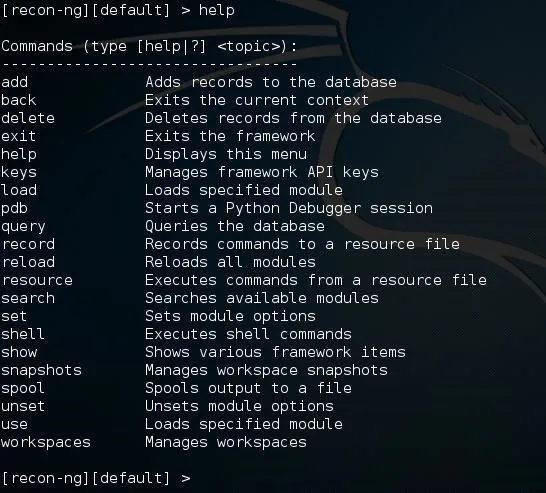
A modular framework (Metasploit-style) designed to automatically gather intelligence about a target by querying multiple data sources.
Its command-line interface is organized in a way that makes it very user-friendly. Through it, you can interact with a database, make HTTP requests, manage API keys, and more.
As with TheHarvester, this tool supports both passive and active reconnaissance.
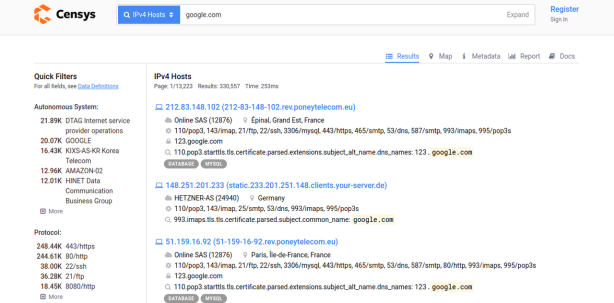
Censys
A powerful search engine for internet-connected devices. It bears a strong resemblance to Shodan, but once again it serves as a complementary tool for your investigations — the subtle differences in how each works will surface different results, and of course allow you to cross-validate the overlapping ones.
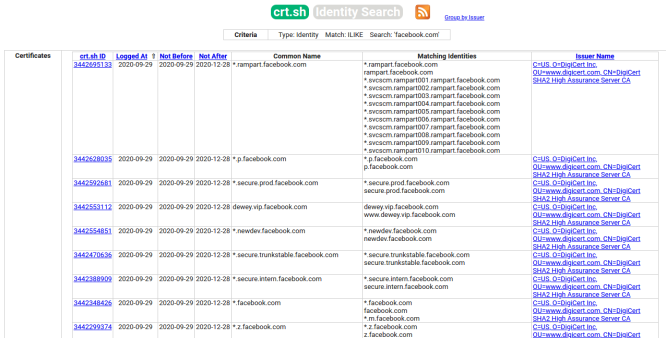
Crt.sh
A tool that allows you to enumerate subdomains based on certificate transparency logs. It is very straightforward to use — simply enter the target in the search box and within seconds it will display all subdomains found in the transparency log.
The certificate transparency log is a record containing all SSL/TLS certificates issued by a CA, intended to make it easy to identify erroneous or malicious certificates.
More information about certificate transparency here
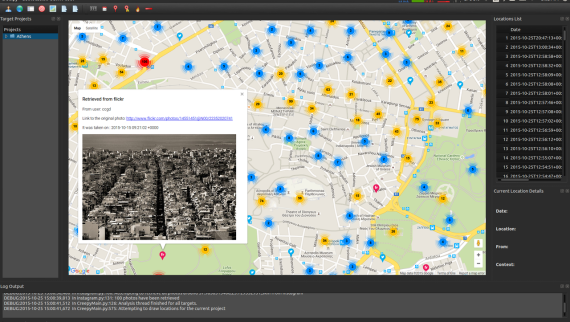
Creepy
A geolocation tool that gathers location-related information from various online sources. It can extract data from Twitter, Flickr, Facebook, and other accounts, then display this information on a map and export it to CSV or KML formats for further use.
DnsDumpster
A useful tool that provides extensive information about a domain through its search interface. All data is collected by querying multiple search engines without running brute force against the target domain. Results are sourced from platforms such as Alexa Top 1 Million, search engines (Google, Bing, etc.), Common Crawl, Certificate Transparency, MaxMind, Team Cymru, Shodan, and scans.io.
It is very simple to use — just enter the target in the search box and wait a few seconds. That said, you will need to set aside time to analyze all the information it returns.
Spyse
A search engine built for pentesters. You can search by domain, IP, certificate, technology, and more — and within seconds it returns highly detailed information about your target: subdomains, certificates, technologies, CVEs, and so on. It also features an advanced search option for more refined queries. It is truly a remarkable tool given the wide range of capabilities it offers and the speed at which it delivers results.
A command-line tool that allows you to extract metadata from publicly available files of various extensions belonging to your target. Metadata can contain a wealth of information useful for advancing an investigation — as we know, metadata stores details relative to the file in question: author name, creation and modification dates, coordinates, software versions, and more.
FOCA
A well-recognized tool in the cybersecurity community. FOCA uses Google, Bing, and DuckDuckGo to find office documents associated with a domain. It then performs metadata analysis on those files and returns the gathered information in an organized manner.
It is highly recommended to check out “How to Analyze Documents with FOCA in Ten Steps” to fully understand how this popular tool works.
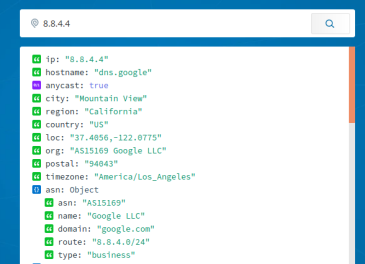
Ipinfo.io
A tool that provides detailed information about any IP address you enter in its search box.
WaybackMachine (archive.org)
The “time machine” of the internet. An incredible resource that lets you view websites as they appeared at different points in the past (provided they have been archived, of course). This project has been archiving different versions of websites since 1996 and boasts 544 billion web pages. WaybackMachine allows you to view a website as it was on a specific date, giving you the ability to access information that may have since been deleted or hidden. Through the Wayback Machine browser extension, you can even take your own snapshots of any website you choose. In Spain, it is already accepted as a valid form of evidence in many jurisdictions.
Imagine how useful a time machine would be to travel back and witness certain things firsthand… Well, that is essentially what WaybackMachine lets you do on the internet.
Osintgram
An OSINT tool for extracting information from Instagram. It provides an interactive shell through which you can analyze Instagram accounts and gather intelligence to support your investigations.
A video (in English) where Network Chuck explains Osintgram in detail.
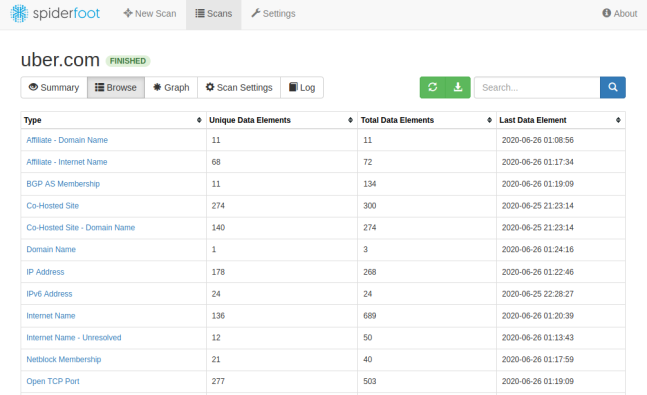
Spiderfoot
Spiderfoot is a reconnaissance tool that automatically queries over 100 public data sources to collect domains, names, emails, addresses, and more.
Simply specify a target and Spiderfoot will surface all relevant information, including potential leaks or data points useful for continuing the investigation. Like many tools mentioned here, it is highly automated and makes it easy to gather large volumes of information quickly.
Google Images (Reverse Image Search)
This technique involves using Google Images’ reverse image search. If you have a photo and want to find information about it (for example, identifying the person in the photo), head to Google Images and upload the photo using the camera icon. Google will then search for possible matches, which you can further narrow down by adding keywords to the search bar.
Below you can see the results returned when searching for a particular image. I previously uploaded the image using the camera icon in the browser’s search bar… and this is the response it returned. Not bad, right?

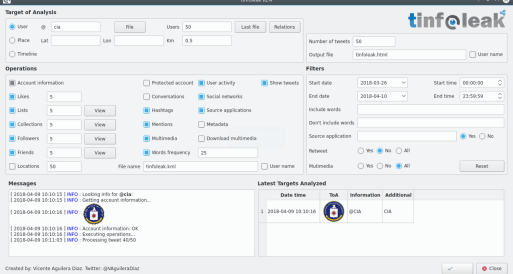
Tinfoleak
A useful tool for extracting information via Twitter. Tinfoleak takes a username, keywords, or coordinates as input and returns a detailed, well-organized report with relevant data.
More details can be found here
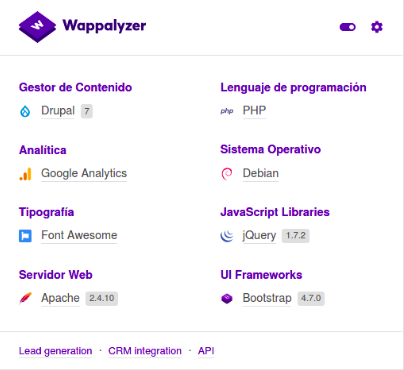
Wappalyzer
A browser extension that lets you identify the technologies powering any website you visit. It is extremely easy to use — simply visit the page in question and expand the plugin info to see details similar to the screenshot below.
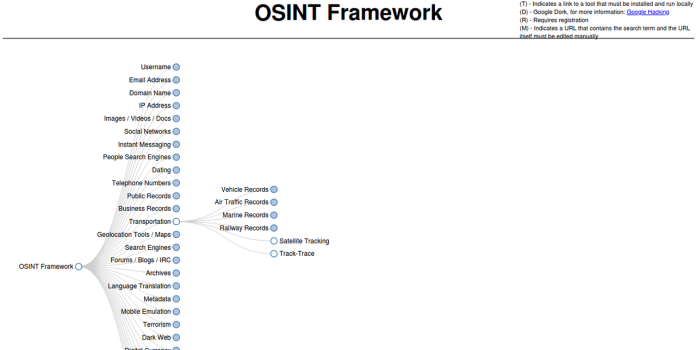
OSINT Framework
OSINT Framework is a project that aggregates a large collection of OSINT tools. On its website, you can find links to the various tools organized by category. Many are web-based tools, while others link to the GitHub repository from which the tool can be installed.
And that concludes this roundup of OSINT tools. As you can see, there is a wide variety of tools available to tackle different attack vectors and information sources. At the same time, as you may have noticed, many tools return very similar results — but as I mentioned several times throughout this article, that is actually a strength, since it allows us to cross-reference findings and gain greater versatility when gathering intelligence.
One more point that should always be kept in mind: tools alone do not complete the job. They only return raw data. Our goal is to generate intelligence. To turn that data into actionable intelligence, we need to process and analyze it — and that is where our skill as investigators comes into play. Pressing a button and launching these tools is simply not enough.
Preguntas Frecuentes
Google Dorks
Also known as Google Dorking or Google Hacking, this technique involves using Google's search operators to perform advanced queries.
Bing Dorks
Same concept as Google Dorks, with subtle differences in operator syntax, which opens up different options and possibilities.
Shodan
A powerful search engine that allows users to discover internet-connected devices through various filters.
Maltego
This is a powerful tool that collects information about a target and displays it as a graph, making it easy to analyze the various relationships at a glance.
TheHarvester
A versatile command-line tool that collects publicly available information from the web (emails, subdomains, names, URLs, and more).